Review
Plan Advisors and warning markers
Understand what a review marker means, inspect the affected condition, and avoid treating software checks as engineering.
6 minUpdated July 28, 2026
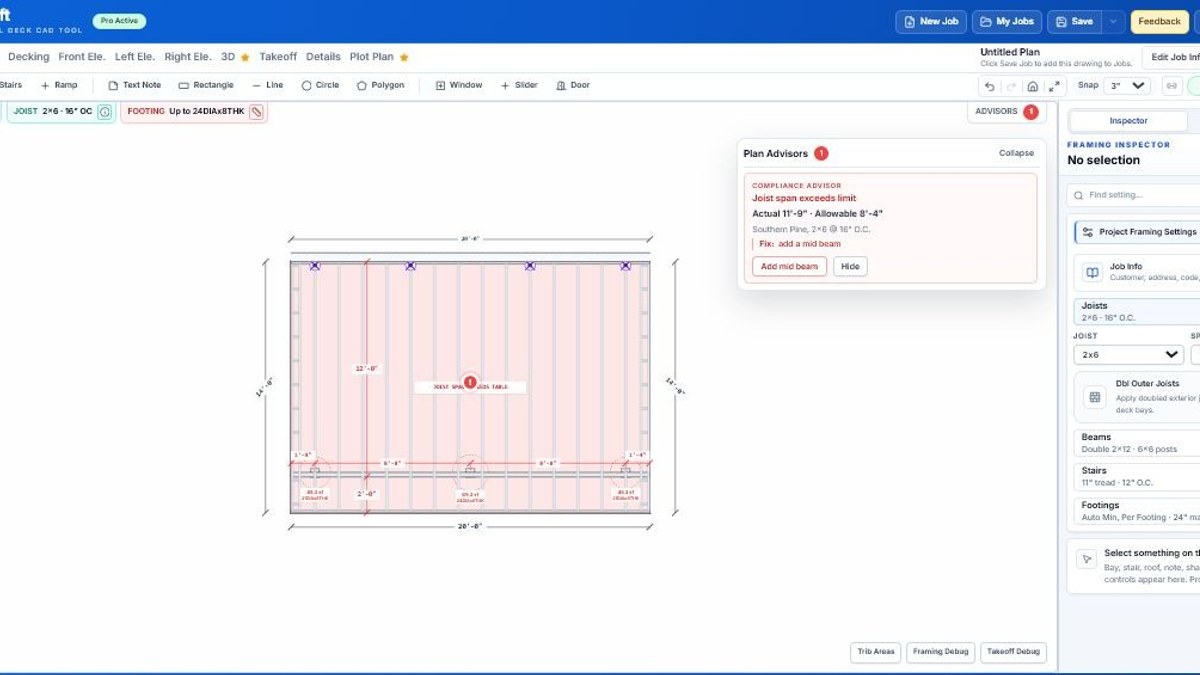
Advisors identify conditions worth reviewing
Plan Advisors use the modeled geometry, selected project settings, and implemented structural or manufacturer profiles. They help find common mismatches and unusual conditions before export.
A marker is a prompt to inspect the condition and controlling source. It is not a permit rejection, engineering stamp, or automatic instruction to increase every member.
Review a marker in context
- 1Open AdvisorsRead the affected element, condition, and explanation.
- 2Select the related geometryConfirm the actual span, support, attachment, or finish condition.
- 3Check project settingsVerify load, material system, member choice, spacing, and footing assumptions.
- 4Choose the correct responseRevise the model, document the review, or obtain project-specific direction.
Know what the software does not know
- Unmodeled site and soil conditions.
- Hidden house framing and existing deterioration.
- Local amendments and reviewer preferences.
- Complete connection and fastener capacities.
- Manufacturer changes published after the implemented reference.
- Project-specific engineering requirements.
Still unclear?
Ask Docs AI about this page, or open DeckDraft when you need AI Help to read the active job.