Built for deck contractors
Professional deck plan sets without a drafting department.
Design the job, help customers picture it, and prepare plans for permit and HOA review. Bring drawings, 3D views, plot plans, and material takeoffs into one deck-focused workspace.
14 days. No card. No automatic conversion.
Used by 50+ deck professionals.
Flexibility with framing guardrails
Build it your way.
Keep the checks connected.
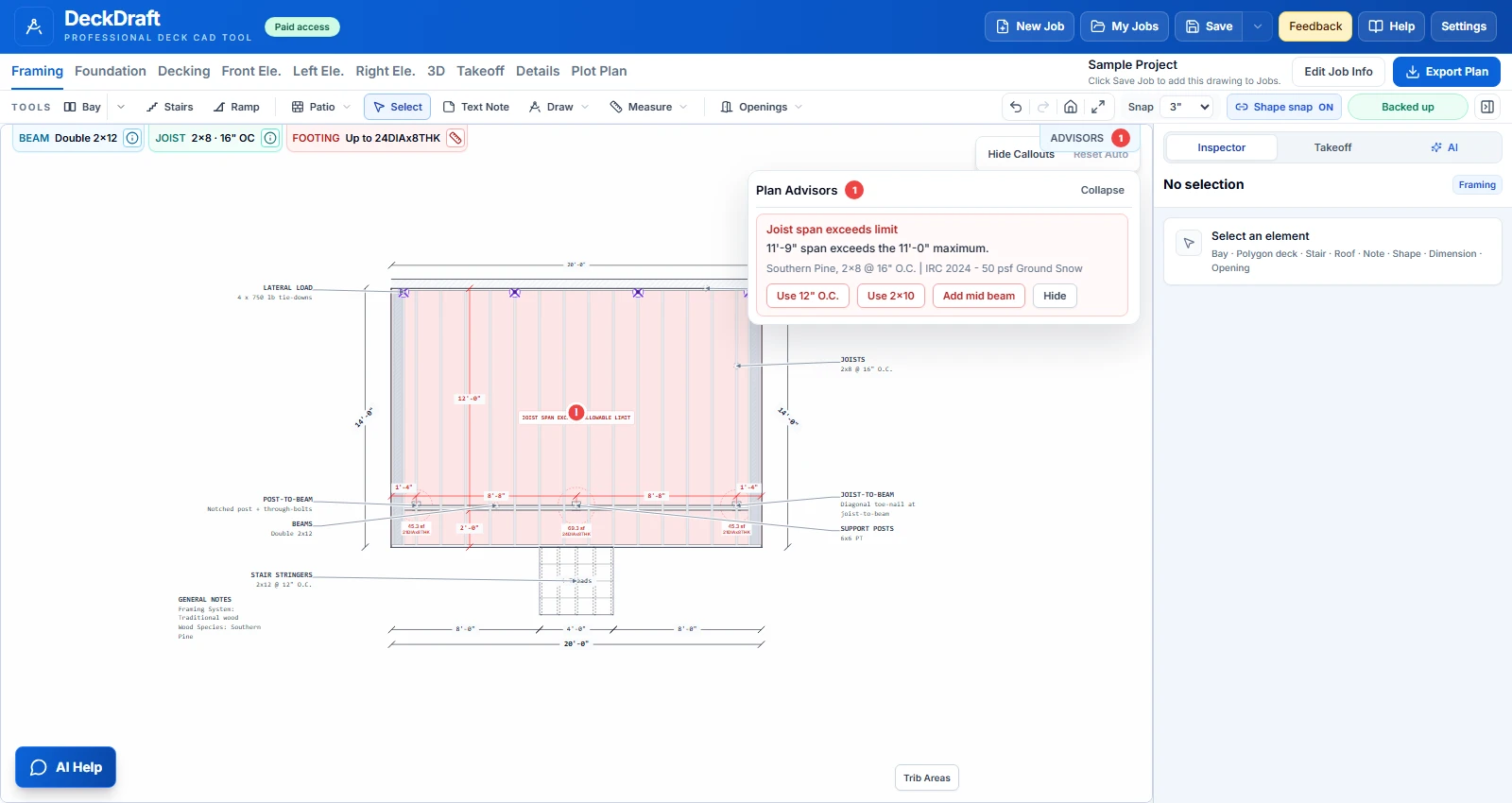
Shape the plan around your construction methods, materials, and site conditions. Adjust the design with the depth a deck contractor needs, while built-in span checks and framing guidance flag conditions that need attention.
Your methods.
Your materials. Your details.
Configure framing, supports, stairs, connections, decking, and railings around how you build. Choose ladder or flat 2×4 / 2×6 blocking for feature boards, drop or upset beams, and your post connections. Save your usual methods as defaults, then adapt them to the job.
Plan Advisors compare actual and allowable spans and show correction options and opportunities to reduce unnecessary material. Adjust the design and review the checks as you go.
Add a bay. Add stairs. See how the plans come togetherBuilt-in guidance supports your judgment, field verification, and required project review.
Design it. Present it. Prepare the documents.
One project.
More ways to move it forward.
From the first customer conversation to plans for review and material estimates, keep the work in one place.
Explore all features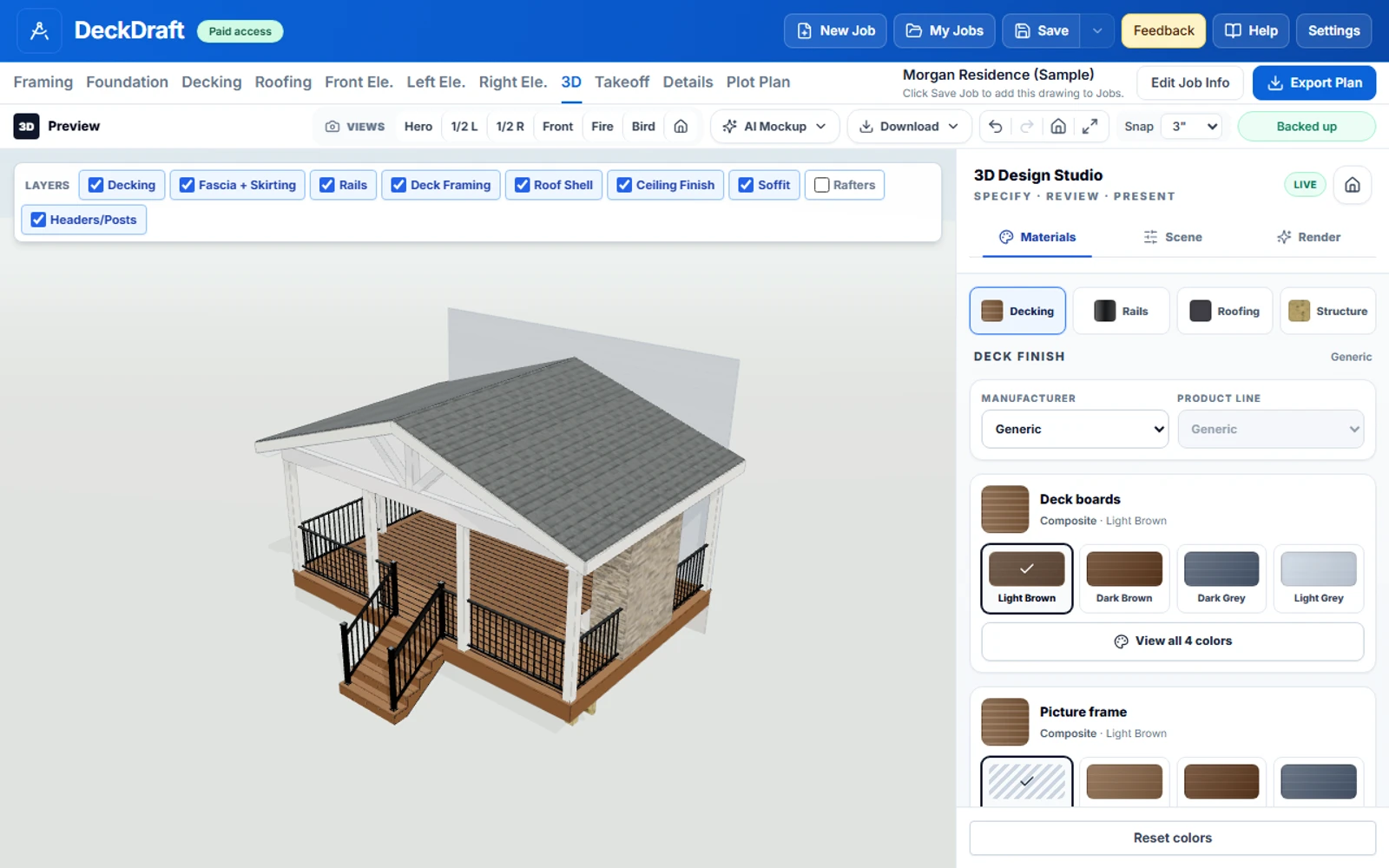
Bring the whole outdoor space into view.
Explore roofs, ceiling finishes, lighting, fans, and fireplaces alongside your deck design.
Actual 3D workspace. Roof configurations and drawing coverage are still expanding.
Watch the product walkthrough
First plan set
“Dude I just did a plan set, first time using this, in 5 minutes”
Estimated savings
“You just saved us probably 35k”
Design flexibility
“I just designed a deck with some weird shapes with a patio with a 10' radius. Your program worked great!”
Customer presentations
“So many of our clients, suppliers, and contractors are impressed with how professional the presentation is that I can provide with these renderings.”
Built from a decade of deck-design experience.Direct support. Customer-led improvements. More to come.August update: custom deck shapes & manual framing · Talk with us

Industry Service Provider memberNorth American Deck and Railing Association
One workspace / One subscription
Keep the expertise.
Rethink the overhead.
Bring routine deck design and plan production into your business, with the tools and direct support to keep work moving.
Try it on your work. We stand behind it.
Start with the free trial. If your first paid subscription is not the right fit, request a refund within 30 days of that first payment.
Read the money-back guarantee termsThe complete DeckDraftCAD workspace
One user. Every feature.
Additional users: $50/month each.
- Plans, plot plans, and material takeoffs
- Deck and covered-porch design in 3D
- Span checks and Plan Advisors
- AI rendering, assistance, and direct support
No card required. No automatic conversion.
Monthly billing begins only when you subscribe.
On your first paid subscription payment.
Let’s get you started
A few things before
your first project.
Have a particular job in mind? We’re happy to talk through it with you.
Ask us about your projectCan I design around how my company builds?
Yes. Configure framing, supports, connections, stairs, decking, and railings around your construction methods, then save your usual choices as defaults. If a detail or project falls outside the current tools, bring it to us so we can help assess the fit.
What can I give my customer, HOA, or permit office?
Create branded PDF packages with plans, elevations, and details, plus plot plans and 3D views to explain the proposed work. Use AI renderings for customer presentations and takeoffs to support estimating. Choose the documents your reviewer requires; submission requirements vary by project.
Does this replace an engineer?
No. Built-in span checks and Plan Advisors help you review common framing conditions, but they do not provide engineering certification or guarantee approval. Where your project requires an engineer, use the drawings as part of that review and verify local requirements and site conditions.
Can you help me set up my first real job?
Yes. Send us your sketch, dimensions, and the details you normally build with, and we can help you work through the setup. You can reach us directly when a tool, setting, or construction detail needs a closer look.
How does the trial work?
You get 14 days to try DeckDraftCAD on your own projects, with no payment card required. The trial does not automatically convert to paid; you choose whether to subscribe. Your first paid subscription payment also comes with a 30-day money-back guarantee.
Your next project is a good place to start
Bring the dimensions.
Build the plan set.
Try DeckDraftCAD free14-day trial. No card. Your decision to subscribe.