May 2026 product update
The workspace became easier to draw, review, export, and share.
May added the first real 3D review loop, a cleaner workspace, richer exports, plot plan markup, custom details, ramps, roofs, takeoff polish, and the early team workflows contractors need around real jobs.
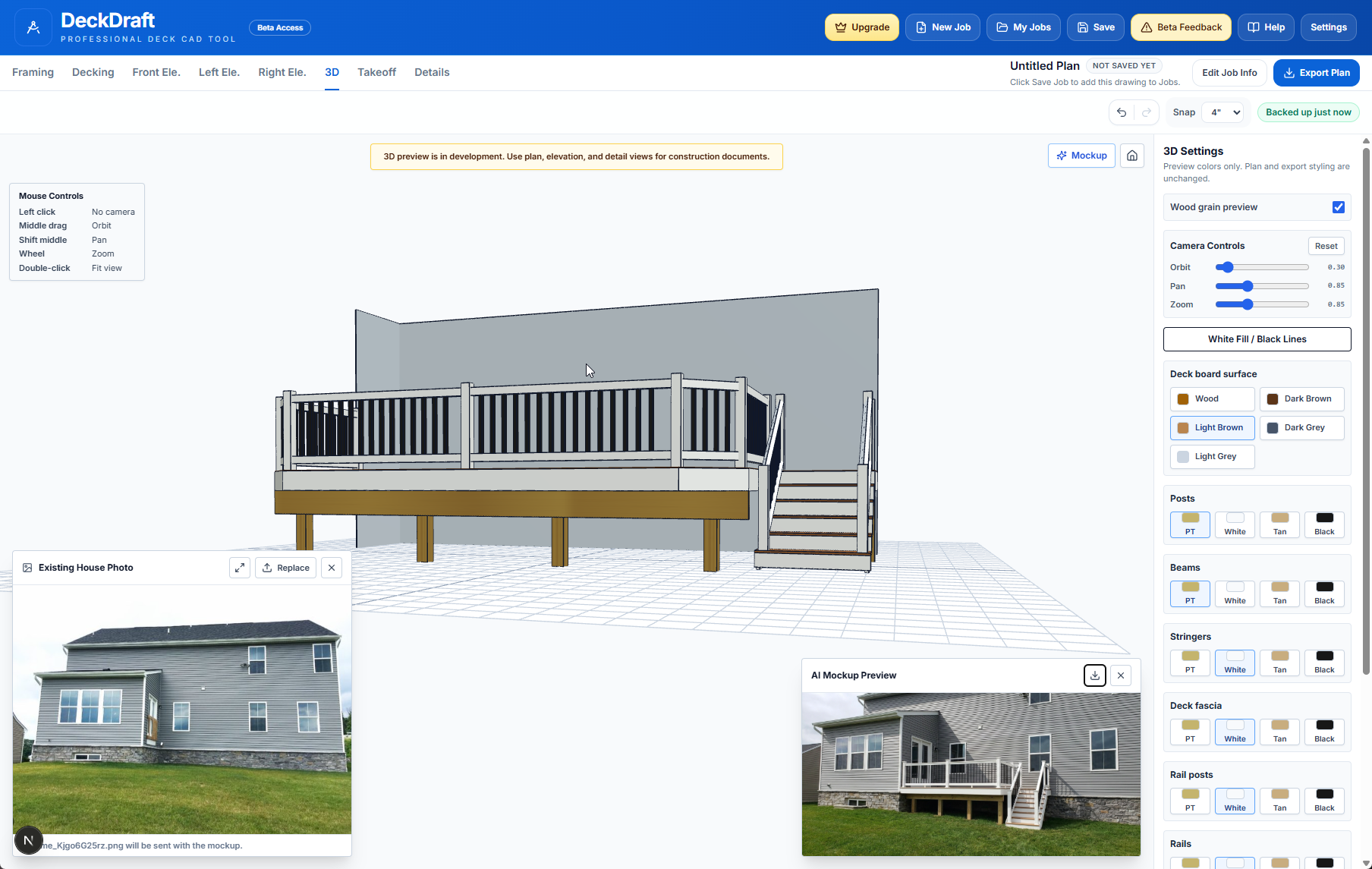
The workspace gained a major UI refresh, undo/redo, stronger inspector controls, and the first real 3D review loop.
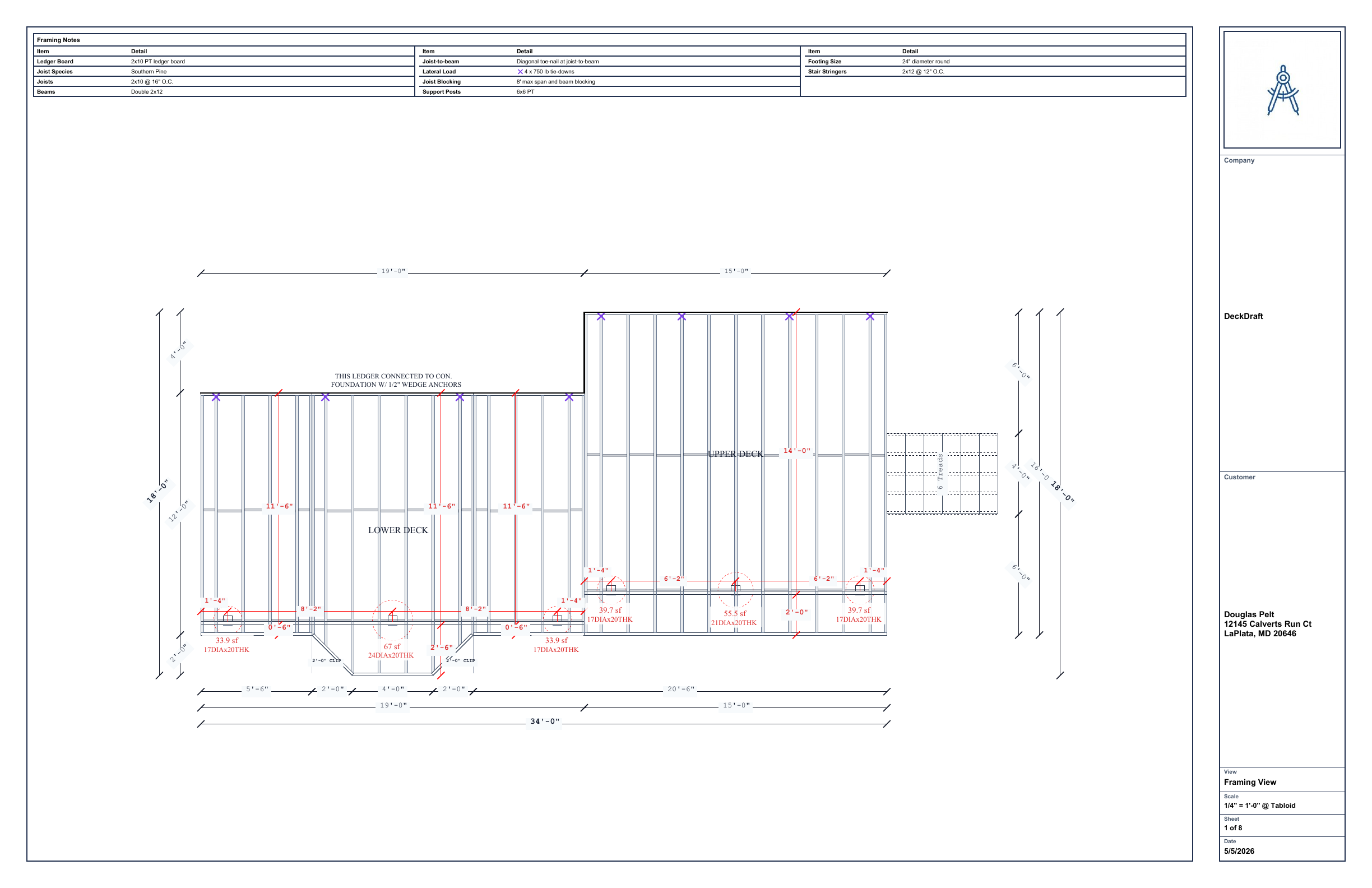
Plan output expanded with 3D preview export, foundation views, plot plan PDF markup, details, elevations, and takeoff polish.
Company sharing, installer defaults, onboarding, settings, and admin workflows started turning DeckDraft into a team-ready product.
3D review
May introduced the 3D review loop and visual mockup direction that later became a core way to inspect deck designs.
Plan output
Plan exports, details, plot plan work, and takeoff cleanup moved the product closer to usable permit-style deliverables.
How to read this update
This update groups a fast-moving month into practical themes instead of listing every small fix. The point is to show the product direction: plan drafting, visual review, permit output, takeoffs, and team workflows moving together.
A More Complete Drawing Workspace
May was the month DeckDraft started feeling less like a prototype and more like a full contractor workspace. The layout, inspector, header, job loading, text controls, dimensions, and review flow all received heavy polish.
- The deck workspace UI was refreshed with cleaner inspector controls, denser settings, and clearer job information.
- Undo, redo, local draft restore prompts, job loading polish, and plan list actions made everyday editing less fragile.
- Text notes, uppercase controls, elevation annotations, plan dimensions, and rail height callouts improved plan communication.
- Installer defaults became explicit, searchable, and easier to apply across company standards.
- Workspace tours, help video support, and onboarding flows made first-run setup easier to follow.
3D Review And Visual Sales Tools
The first full 3D review loop landed in May. Contractors could move from plan work into a visual model, adjust appearance, and use that view for customer review and mockup workflows.
- The 3D deck viewer shipped with control settings, home color presets, railing improvements, and mobile control polish.
- 3D joists, ledger framing, trim, feature blocking, stair rails, risers, wood textures, composite swatches, and post cap models improved model confidence.
- The AI mockup workflow and standard/pro mockup options gave customers a more visual preview path.
- A 3D preview PDF export connected visual review back to the plan set.
- The landing page gained stronger sample plan proof and product imagery to show what DeckDraft could produce.
Permit Output, Details, And Site Work
May also expanded the drawing package beyond the main deck plan. Foundation views, plot plan markup, details, roofs, ramps, terrain, and special framing cases all moved forward.
- Foundation plan export, elevation annotations, stair and landing elevation fixes, and plan wall dimensions improved permit-style output.
- Plot plan PDF workspace support made it possible to upload, mark up, persist, and rehydrate site plans.
- Account-level custom detail uploads, admin detail defaults, Diamond Pier detail updates, and footing detail syncing improved detail management.
- Ramp framing, ramp elevations, rear stairs, 4x4 landing framing, hot tub framing areas, and helical reporting expanded job coverage.
- Shed roof controls, roof assembly geometry, roof takeoffs, screen rendering, yard grade, stair terrain, and elevation grade controls added more real-world context.
Takeoffs, Materials, And Team Workflow
The less glamorous May work mattered too: material quantities, trim, team sharing, company administration, and export gates all got more solid. That is the work that helps a product survive contact with real customer jobs.
- Decking layout, deck trim rendering, stair picture-frame rendering, material appearance, and board controls improved takeoff and visualization consistency.
- Hidden footings, special footing overrides, takeoff page scrolling, overlay debugging, and framing merges made quantities easier to trust and review.
- Plan set email export, freemium export gates, trial reset copy, and clean access messaging clarified what users could export.
- Company team administration, explicit team plan sharing, bulk invites, member adoption, and admin transfer tools moved team workflows forward.
- Admin dashboard polish, product update preferences, feedback email notifications, and resource pages improved customer communication.
Why it matters
May gave customers more proof that DeckDraft could handle real production work.
The visible wins were 3D review, cleaner drawings, plot plan support, better settings, and more complete exports. The quieter wins were just as important: takeoff cleanup, defaults, team sharing, admin support, and more reliable saved-job behavior.
That combination is what made the later June and July updates possible. The product was not only adding isolated features. It was building the workflow foundation around contractor deck drawings.
Try the latest workspace